Handled
Sign inCreate free account

WRITE

Just write it.
Handled finds the owner.

Say what you need in plain words. Handled sends it to whoever owns that subject, with one line saying why.

WHAT HAPPENS NEXT

Write → Route →
Claim → Complete

One place to ask.A clear person responsible.An ending you can see.

01WRITE
What do you need?

The supplier’s late again.
Can someone check the delivery?

order.pdf

Plain words are enough.

A request, a question, a decision. Add a deadline or a file. You don’t need to know who to send it to.

02ROUTE
A late delivery
Supplier contracts ✓
ES2 owners. One claims it.

Responsibility, resolved.

Handled matches the request to a subject. Its owners see the work. One person claims it. If the subject is unclear, you can choose it.

03HANDLE
✓Handled.Delivery confirmed for Friday.
Erik completed this ↗

A finish. Not another follow-up.

Replies, files and the outcome stay together. Finished work leaves the queue. Its record is there when you need it.

ROUTING THAT LEARNS YOUR WORK

Good work teaches
the next request.

Handled learns from your subject corrections and repeated Public work that people take responsibility for and complete. Familiar requests can find the right subject with less guidance.

Your corrections take priority. Your ownership map stays in charge.

Illustrative example
  1. A REQUEST COMES IN

    “Can someone check the delivery delay?”

    Supplier contracts
  2. YOUR TEAM HANDLES IT

    Similar Public requests. Completed by their owners.

  3. THE NEXT FAMILIAR ASK

    “Another delivery delay. Can we get an update?”

    Supplier contracts

Repeated work helps inform the subject. Its current owners still take responsibility.

BUILDS ITSELF

Your work evolves.
Handled helps you organise it.

As new kinds of work arrive, Handled suggests new subjects and owners. Your team confirms.

You confirm. Nothing changes until you do.
Handled suggests. A person always decides.

Try it with your own request

SPACE TO DO YOUR ACTUAL WORK

Less noise.
More headspace.

Requests follow delivery windows, and urgent ones arrive at once. Set a cadence for each subject and quiet hours for your company. Talk messages notify you as they come, and you can mute any talk. Nobody can see when you’re online, typing or reading. Your queue is designed to get smaller.

✓
Nothing needs you.You’re clear. Go do your thing.
09:00

THE RIGHT PEOPLE. THE RIGHT CONTEXT.

Some work is public.
Some work is private.

Choose Public for company members and collaborators with subject access. Choose Private for just you and the subject’s owners. Replies and attachments follow the same rule. A talk is only for the people in it.

Read about privacy

WORK KEEPS MOVING

Away doesn’t mean
at a standstill.

For Public work, a configured backup can cover new requests while you’re away. Unclaimed requests are assigned after two company delivery windows, when an eligible owner is available.

E Erik AwayS Sofia Backup

Illustrative example. Set up backup coverage for your subjects.

SEE WHERE WORK STANDS

Solved, open, stuck.
And why.

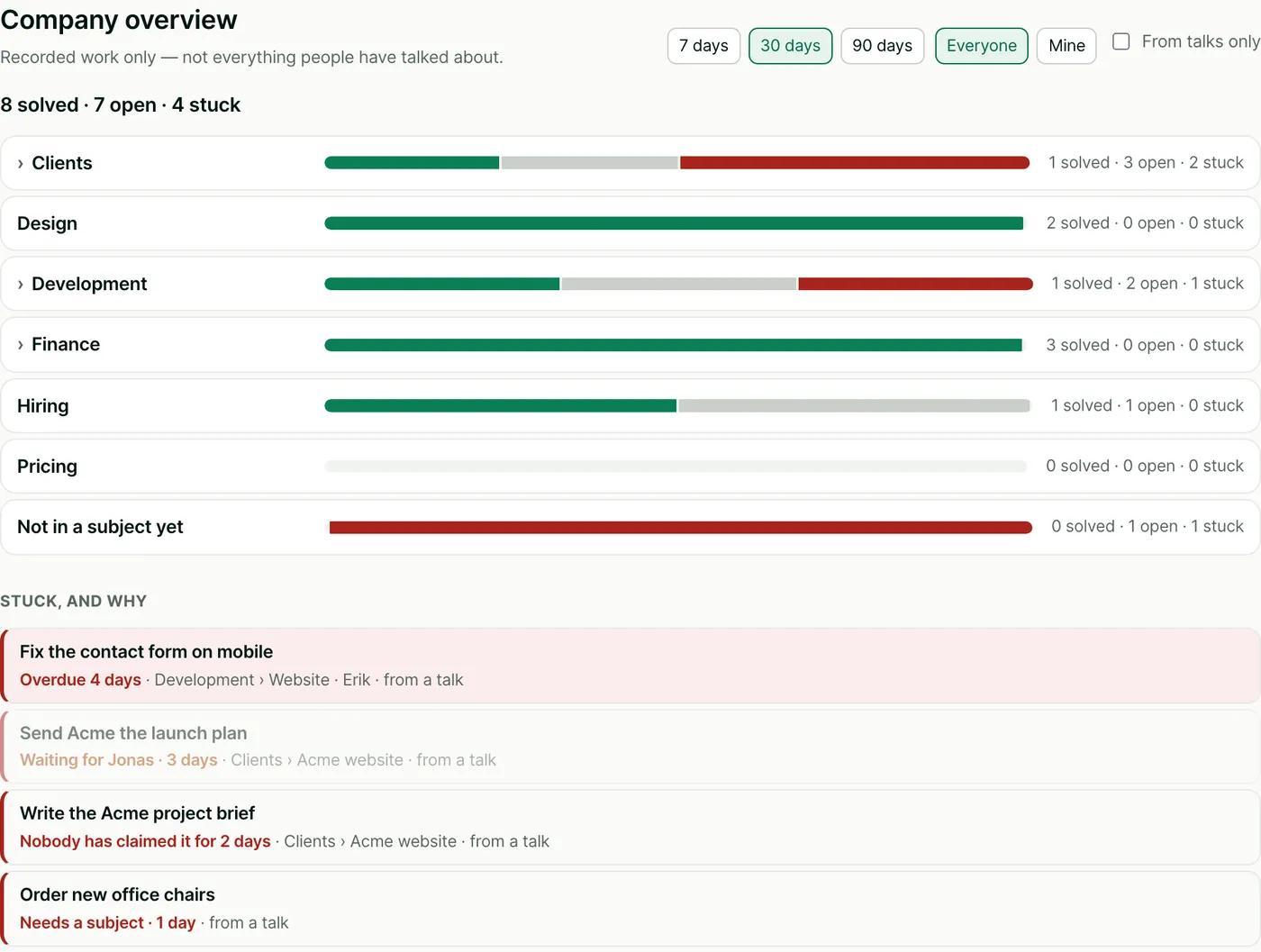
The overview shows every part of your company at a glance. What got solved, what’s open and what’s stuck. Each stuck task says why, so you know where to help.

Give your team a clearer view
Company overview for the last 30 days: 8 solved, 7 open, 4 stuck. A bar per division. Under Stuck, and why: Fix the contact form on mobile, overdue 4 days. Send Acme the launch plan, waiting for Jonas for 3 days. Write the Acme project brief, nobody has claimed it for 2 days. Order new office chairs, needs a subject.

Every stuck task has a reason.

Overdue 3 days. Nobody has claimed it for 2 days. Waiting for Jonas. Open it and lend a hand.

Decisions live on their subjects.

A decision saved for everyone is filed under its subject, with the date it was made and its history. Anyone can look it up later. Nobody is notified.

Work, not conversations.

The overview counts tasks and decisions, never what people said in a talk. Compare 7, 30 or 90 days, or switch to your own work.

Company views include Public work you can access. Private to-dos never show up in anyone else’s numbers. Figures above are from a demo company.

GOOD QUESTIONS

A little more
clarity.

How does Handled know who owns the work?

Handled matches what you write to your company’s subjects and their owners. One person claims responsibility. When the subject is unclear, you can choose it. Corrections help future matching.

Can several people own the same subject?

Yes. All the subject’s owners see new work, and one claims responsibility. The other owners keep access to the conversation, so context stays with the subject.

What happens to replies and attachments?

They stay with the request. You can reply, attach files or paste an image. When the work is complete, you can find the outcome and conversation from its subject history.

Does everyone see everything?

Company members can read Public work; collaborators read Public work in their granted subjects and their own posts. Private work is readable only by its author and current subject owners. Talks are different: only the people in a talk can read it, and company admins can’t open it. Before a private request has a subject, only its author can see it. An offline device receives access changes when it reconnects.

FREE FOR YOUR WHOLE COMPANY FOR 30 DAYS

Less chasing.
More handled.

Bring your whole team in from day one.
Everyone is free for the first 30 days.